

Enterprise AI is moving fast. The days of just experimenting with generic AI assistants are over. Today, companies don't want standalone tools that sit outside their day-to-day operations; they need AI woven directly into their existing workflows, secure data systems, and compliance frameworks [1].
That is exactly where Microsoft Copilot Studio comes in. Instead of forcing companies to rely on generic, one-size-fits-all chatbots, Copilot Studio lets teams build specialized AI agents designed for their specific internal systems and business processes. The result is a shift to true digital agents-AI that doesn't just chat, but understands context, reasons through problems, and executes real work.
From Conversational AI to Operational AI
Copilot Studio is a low-code platform that combines:
- Natural language interaction
- Enterprise data connectivity
- Workflow automation
- Security and compliance controls
This combination allows organizations to move from conversational AI to operational AI systems that actively participate in business processes.
Typical enterprise copilots include the following:
|
Function |
Capabilities |
|
Customer Support |
Ticket resolution, knowledge retrieval, escalation |
|
HR |
Policy guidance, onboarding workflows |
|
Finance |
Report summaries and anomaly detection |
|
Sales |
CRM insights and meeting preparation |
|
IT Operations |
Incident response and service automation |
The differentiator is context-grounding. These copilots operate on enterprise data, helping to make the responses more accurate, actionable, and trustworthy.
1. How Enterprise Copilots Are Architected [2]
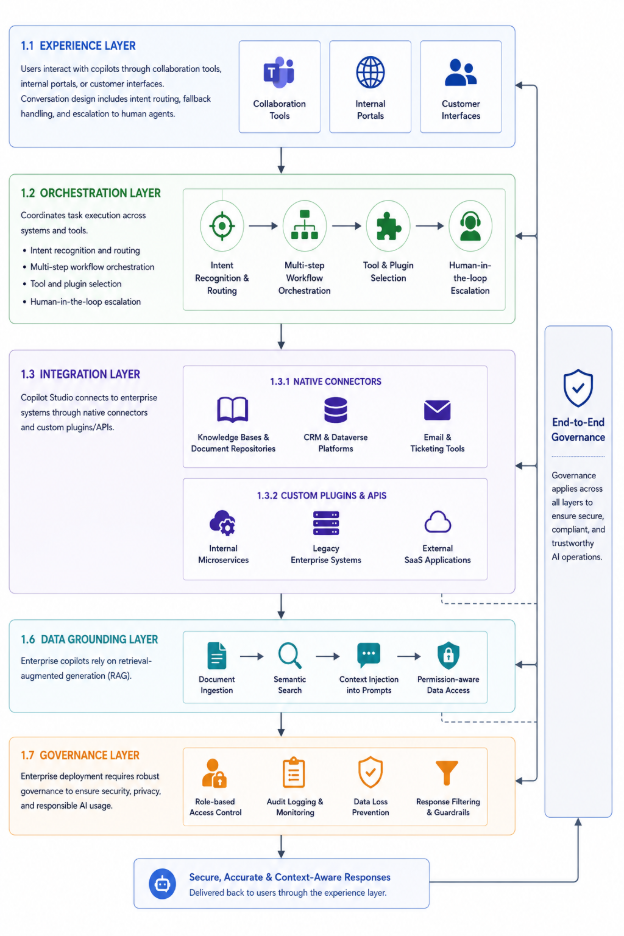
Production-ready copilots typically follow a layered architecture.
1.1 Experience Layer
Users interact with copilots through collaboration tools, internal portals, or customer interfaces. Conversation design includes intent routing, fallback handling, and escalation to human agents.
1.2 Orchestration Layer
This layer coordinates task execution:
- Intent recognition and routing
- Multi-step workflow orchestration
- Tool and plugin selection
- Human-in-the-loop escalation
Example workflow: An employee requests a laptop → the copilot validates permissions → creates an IT ticket → triggers approval → sends notifications.
1.3 Integration Layer
Copilot Studio connects to enterprise systems through:
1.3.1 Native connectors
- Knowledge bases and document repositories
- CRM and Dataverse platforms
- Email and ticketing tools
1.3.2 Custom plugins and APIs
- Internal microservices
- Legacy enterprise systems
- External SaaS applications
This enables copilots to perform real business actions rather than provide static answers.
1.4 Native connectors
- Knowledge bases and document repositories
- CRM and Dataverse platforms
- Email and ticketing tools
1.5 Custom plugins and APIs
- Internal microservices
- Legacy enterprise systems
- External SaaS applications
This enables copilots to perform real business actions rather than provide static answers.
1.6 Data Grounding Layer
Enterprise copilots rely on retrieval-augmented generation (RAG):
- Document ingestion and semantic search
- Context injection into prompts
- Permission-aware data access
Grounding ensures responses remain accurate and compliant.
1.7 Governance Layer
Enterprise deployment requires:
- Role-based access control
- Audit logging and monitoring
- Data loss prevention policies
- Response filtering and guardrails
Governance is essential for scaling AI safely.
2. Real Enterprise Use Cases [3]
2.1 Customer Support Copilot
A global organization handling high-ticket volumes implemented a support copilot integrated with CRM and knowledge bases. It classifies tickets, suggests responses, summarizes customer history, and escalates complex cases.
Impact: Faster resolution times, consistent service quality, and reduced onboarding effort for new agents.
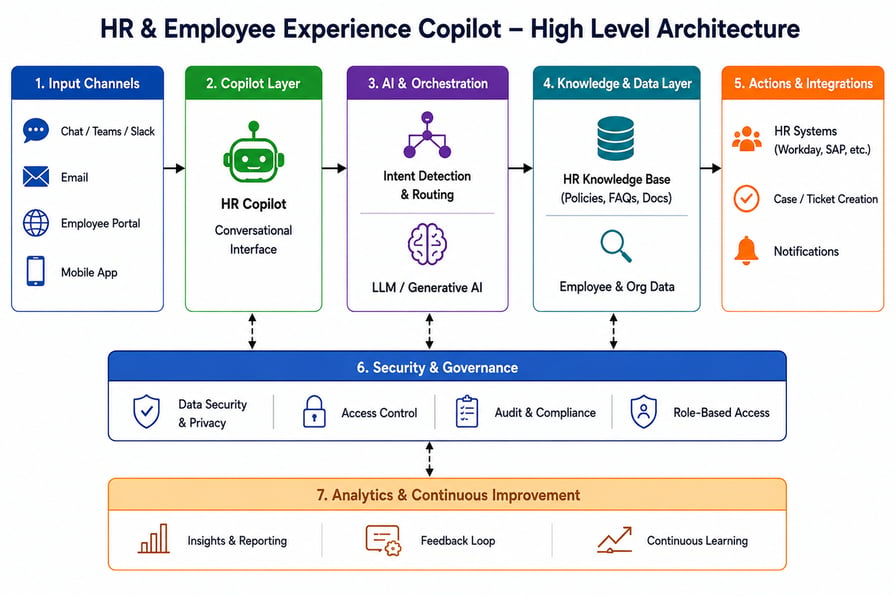
2.2 HR and Employee Experience Copilot
A HR copilot connected to internal documentation and HR systems answers policy questions; initiates leave requests and automates onboarding workflows.
Impact: Reduced HR helpdesk workload and improved employee experience.
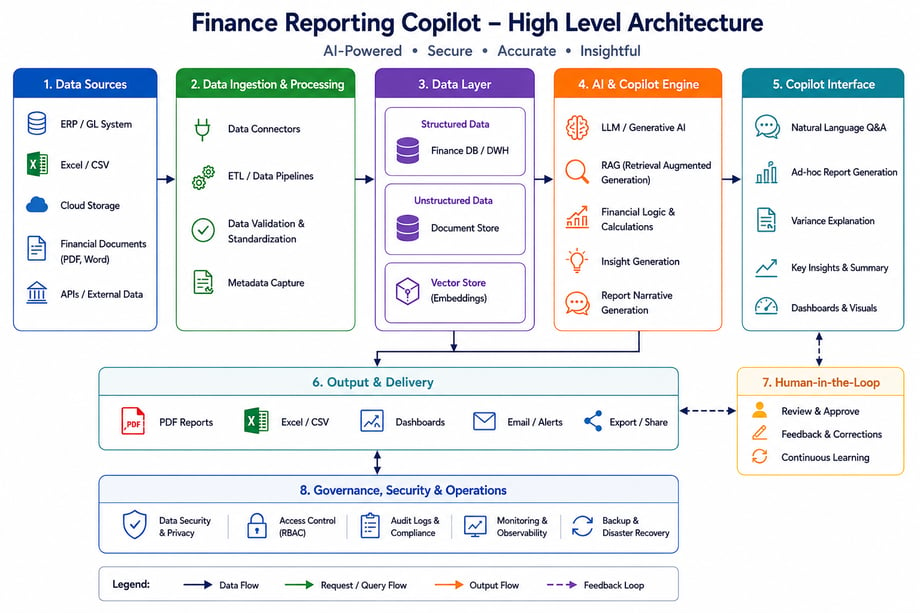
2.3 Finance Reporting Copilot
A finance copilot connected to enterprise data warehouses generates monthly summaries, detects anomalies, and prepares executive briefings.
Impact: Shorter reporting cycles and increased focus on strategic analysis.
3. Multi-Agent Workflows and Power Platform Integration [4]
Organizations are highly interested in adopting multi-agent ecosystems, where multiple copilots collaborate with each other across all departments. For example, an onboarding process may involve an HR agent creating an employee profile, an IT agent provisioning accounts, and a finance agent allocating the budget.
3.1 Copilot Studio becomes significantly more powerful when integrated with the Power Platform ecosystem:
- Power Automate for workflow automation
- Power Apps for business applications
- Dataverse for unified data storage
- Power BI for analytics and reporting
This integration creates a seamless flow from conversation → action → insight.
3.2 What is the use of these platforms?
- Business Process Automation: Automates repetitive tasks such as approvals, notifications, customer support, and data processing.
- Custom Application Development: Enables rapid creation of business applications with low-code/no-code tools.
- Data Analytics and Visualization: Helps organizations analyze data and create interactive dashboards using Power BI.
- AI-Powered Decision Making: Allows AI agents to collaborate and perform intelligent actions across business systems.
3.3 Benefits of Multi-Agent Workflows and Power Platform Integration
- Increased Efficiency: Multiple AI agents can work simultaneously on different tasks, reducing processing time, and minimizing manual effort.
- Enhanced Scalability: Organizations can easily add new agents or workflows as business requirements grow without redesigning the entire system.
- Improved Accuracy: Specialized agents focus on specific responsibilities, leading to better decision-making and fewer errors.
- Seamless System Integration: Power Platform connects AI agents with Microsoft services, databases, and third-party applications, enabling smooth end-to-end automation.
4. Implementation Best Practices [5]
Successful copilots typically follow these principles:
- Start with a focused use case-target high-value workflow first.
- Prepare enterprise data - AI effectiveness depends on data quality and accessibility.
- Design for action-Automation drives measurable productivity gains.
- Continuously iterate: Monitor usage, refine prompts, and improve workflows.
- Copilots should be treated as long-term products, not one-time deployments.
5. Conclusion
Custom copilots built with Microsoft Copilot Studio represent a diversion of static enterprise software to intelligent, task-driven digital agents embedded in everyday work. When set up with a solid structure, trustworthy data, and strong rules, these systems make work smoother, speed up tasks, and lead to noticeable increases in productivity.
The technology is ready. The organizations that implement it thoughtfully will be the ones that realize its full value.