
Introduction
As we all know, AI is growing in all sectors and helping all of us in day-to-day life with simple as well as complex tasks. We also know that AI can handle much more than that, and we are using some part of AI in our lives to make our lives easier.
These AI applications work like regular applications on the cloud. They are deployed on cloud platforms like AWS, Azure, or GCP.
Every cloud provider has its own AI services, and they provide these AI services to multiple organizations. As AI is growing within organizations, they are building their own custom AI agents to support their organizational growth. Organizations like us are working on multi-agent systems, where one agent can perform a specific task, such as answering organization policy–related queries, while another agent helps in IT support by assisting employees. But this is not sufficient. Using and selecting an agent based on a specific requirement is good, but not enough to solve complex problems. For complex scenarios, we need agents that can perform multiple tasks, such as answering queries as well as performing operations, and answering multiple queries that are dependent on multiple systems with multiple data sources that need to be analyzed to answer a query.
To solve complex queries, this is where the Multi-Agent Architecture comes into the picture. It improves scalability, fault tolerance, and maintainability. When deployed on Microsoft Azure, these systems benefit from serverless compute, managed messaging, built-in security, and enterprise-grade observability.
In this blog, we’ll walk through a deployment architecture for a multi-agent system on Azure, explaining each layer and the role it plays.
High-Level Architecture Overview
To understand agentic deployment, we first need to understand application development architecture layers. There are typically 5–7 layers.
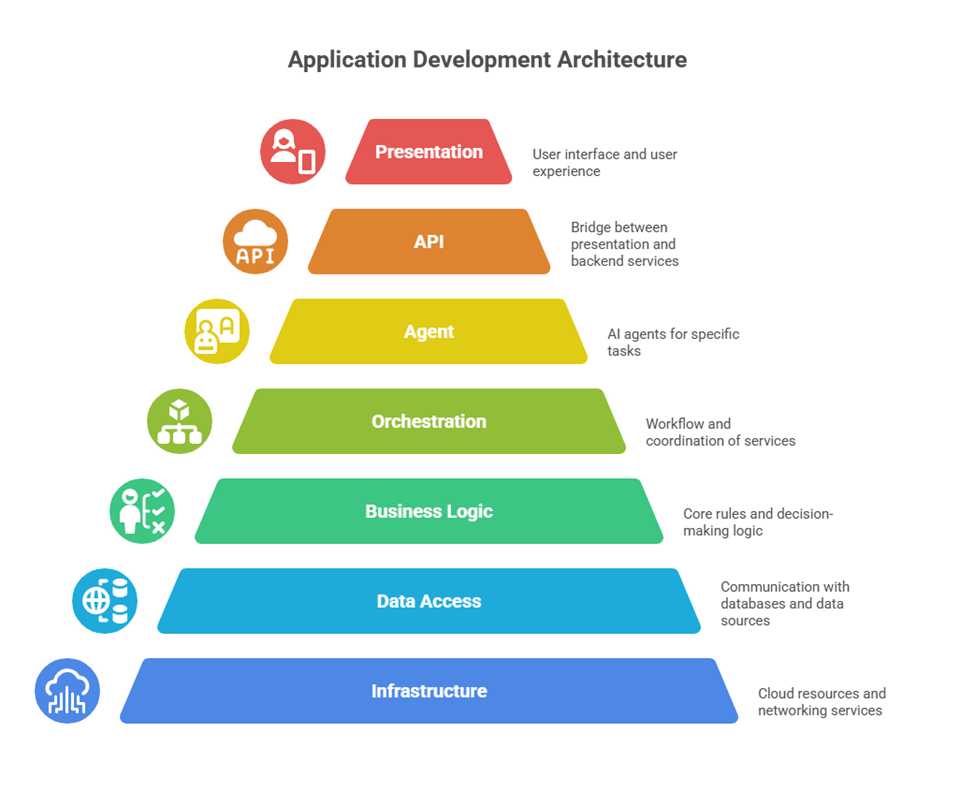
But when deploying a multi-agentic model, the architecture can be divided into four logical layers:
- Agent Layer
- Orchestration Layer
- Communication Layer
- AI & Decision Layer
Each layer is independently scalable and loosely coupled, enabling resilient and cost-efficient deployments.
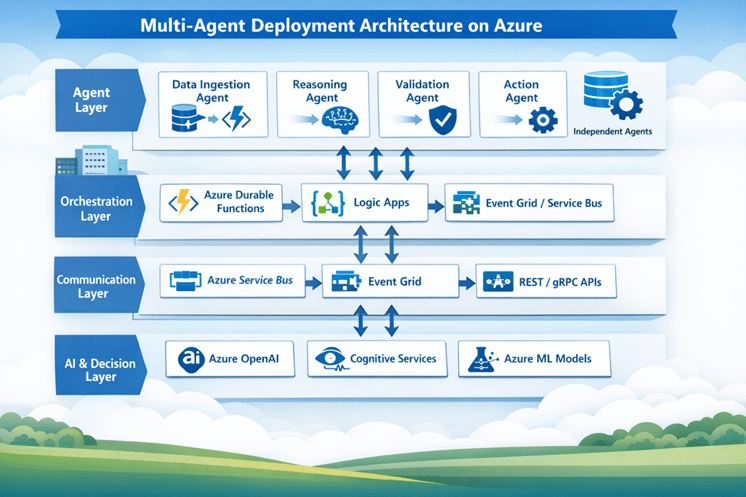
Figure: Multi-Agent Deployment Architecture on Azure
1. Agent Layer
The Agent Layer is where the actual work happens. It contains multiple independent agents, and each agent is built to do one specific job well.
For example:
- A Data Ingestion Agent collects data from external systems, files, or APIs.
- A Reasoning Agent uses LLMs or predefined rules to analyze inputs and decide what to do next.
- A Validation Agent checks data quality, policy compliance, or business rules.
- An Action Agent performs the final operations, such as updates, notifications, or system integrations.
On Azure, these agents are commonly deployed using Azure Functions, Azure Container Apps, or Azure Kubernetes Service (AKS). Each agent is designed as a stateless service, which allows Azure to scale it independently based on demand.
2. Orchestration Layer
The Orchestration Layer controls how agents work together and in what order. Without orchestration, agents may run randomly or repeatedly, leading to unexpected behavior.
There are some patterns of Orchestration. To solve different problems.
Sequential orchestration is the simplest form. Agents run one after another in a fixed order. Each agent works on the output of the previous one. This approach works well when tasks must happen step by step, such as drafting, reviewing, and finalizing a document.
Concurrent orchestration allows multiple agents to work at the same time on the same request. Each agent looks at the problem from its own angle, and the results are combined at the end. This is useful when you want faster responses or multiple opinions, such as analyzing data from different perspectives.
Group chat orchestration is more conversational. Multiple agents participate in a shared discussion, guided by a manager. Agents can review, challenge, or improve each other’s responses. This pattern fits well for brainstorming, reviews, and situations where human oversight is needed.
Handoff orchestration works like passing a task between specialists. An agent starts the work and, if needed, hands it over to another agent that is better suited for the task. This is common in support systems where different agents handle billing, technical issues, or account-related questions.
Magnetic orchestration is used for complex and open-ended problems. One main agent creates a plan and keeps track of progress, while other agents help by gathering information or taking actions. The plan evolves as the problem becomes clearer, making this approach useful for automation and incident response.
This layer is important because it:
- Prevents uncontrolled agent execution
- Handles retries and failures gracefully
- Maintains workflow state
- Supports long-running processes
Azure services like Azure Durable Functions are commonly used for stateful workflows, while Azure Logic Apps provide a visual, low-code way to manage orchestration. Event-based triggers help make execution reactive and efficient.
Think of this layer as a conductor, making sure all agents play their part at the right time.
3. Communication Layer
In a multi-agent system, agents should never be tightly coupled. Instead, they communicate using events and messages, which keeps the system flexible and resilient.
This approach provides:
- Loose coupling between agents
- Better fault isolation
- Asynchronous processing
- Horizontal scalability
On Azure, communication is typically handled using Azure Service Bus (Queues or Topics) and Azure Event Grid. When synchronous communication is required, REST or gRPC APIs are used.
Here, we can introduce the security aspect as well. When talking about communication, implementing a firewall as the entry point of the communication layer is important, especially where user interaction happens. This helps implement DDoS protection mechanisms to prevent hacker attacks, as well as secure and govern AI applications.
We can also manage database connections so that databases are accessible only through private connectors. Each database can be connected to specific agents, and other agents are not allowed to access that data. This access can be controlled based on network rules as part of the communication layer.
This layer ensures that agents can evolve, scale, or fail independently without breaking the entire system.
4. AI & Decision Layer
The AI & Decision Layer provides the intelligence behind the agents. This is where reasoning, understanding, and decision-making happen.
This is the core part of AI systems, which includes AI services. As we know, nowadays AI is growing, and every cloud provider is providing AI services that we can use to build AI applications. Every service defines its own purpose. For example, Azure OpenAI helps with reasoning, writing emails, generating images, and so on. Other AI services help to find documents from SharePoint, like AI Search, and some are used to extract details from scanned PDFs, like Document Intelligence, and so on.
Key capabilities include:
- Natural language understanding
- Reasoning and planning
- Vision, speech, and language processing
- Custom machine learning inference
Azure services such as Azure OpenAI Service, Azure Cognitive Services, and Azure Machine Learning models are commonly used here. Each agent can consume these AI services independently, allowing domain-specific intelligence where it is needed most.
Security Considerations
A multi-agent system introduces multiple entry points, which makes security a critical part of the design.
Some best practices include:
- Using Managed Identities instead of hard-coded secrets and SSO
- Storing sensitive information in Azure Key Vault
- Applying RBAC with least-privilege access
- Using Private Endpoints for internal communication
Security should be built into the architecture from the beginning, not added later.
Observability and Monitoring
Debugging and monitoring distributed agent system scan be challenging without proper visibility.
A recommended approach includes:
- Azure Application Insights for logging
- Azure Monitor for metrics
- Distributed tracing using OpenTelemetry
It’s important to track things like:
- Agent execution duration
- Message queue latency
- Failure and retry patterns
This level of observability helps teams understand system behavior and quickly identify issues across the entire workflow.